

Cataloging & MARC
Importing MARC records into Koha
Staging first, committing second — and the reason that two-step design is the most useful safety feature Koha has. With the command-line equivalents for files too big for a browser.
By Babar Junaid
Published 2026-11-18 · Tested against Koha 26.05
Importing is always two steps: stage the file, which loads it into a holding area and reports what it would do, then commit the batch, which writes the records into the catalog. Do it in Tools → Stage MARC records for import, check the match report, then commit from Manage staged MARC records. A committed batch can be reverted; an unstaged import cannot be undone at all.
Import ten records before you import ten thousand
- Cut a sample file, import it, and open two or three of the records it created.
- Have a backup you have restored before a large import, not just one that exists.
- Know which framework the records should use before you commit, not after.
Step 1: Stage the file
- 1Go to Tools → Stage MARC records for import and upload the file.
- 2Set the character encoding. UTF-8 for anything modern; MARC-8 for older exports. Getting this wrong is what produces mangled diacritics, and it cannot be fixed after committing except by reverting and re-importing.
- 3Choose the record type — bibliographic or authority.
- 4Choose a matching rule if you have one. This is what decides "new record" versus "update the existing one".
- 5Decide what happens to items in the file — add them, ignore them, or replace existing ones.
- 6Click Stage for import and wait for the job to reach 100%, then click View batch.
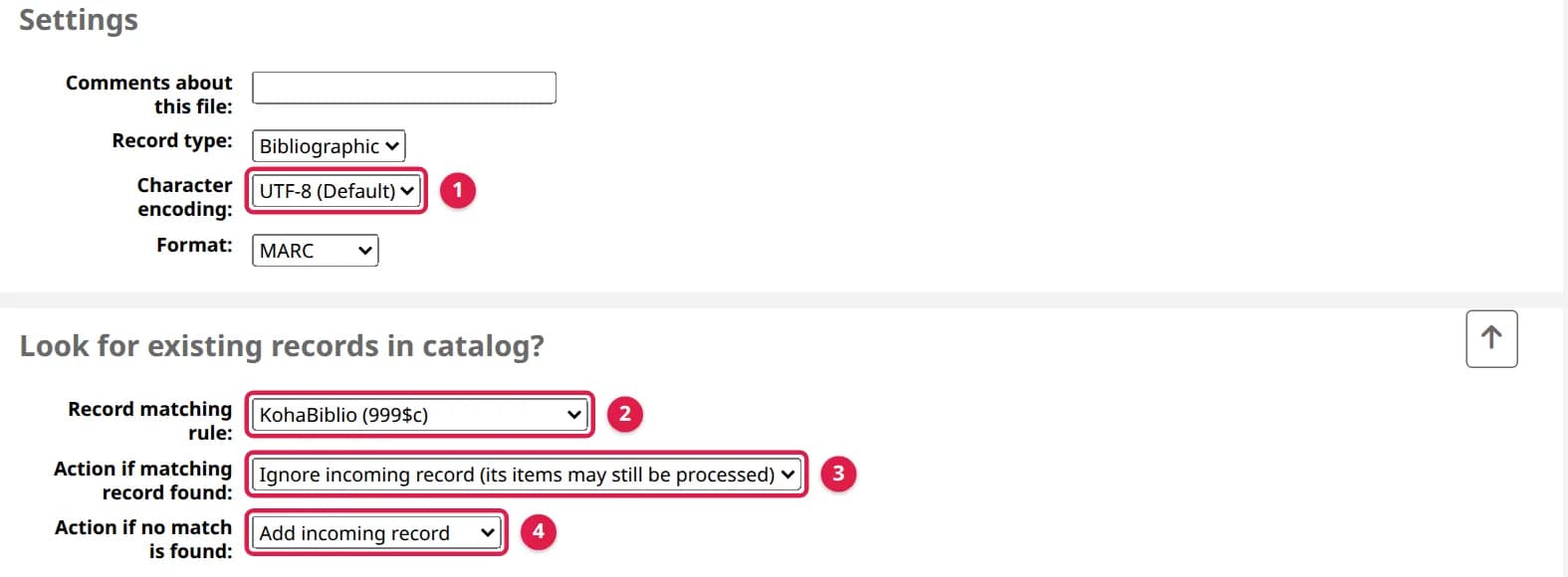
Nothing has been written to the catalog yet. Staging only parses the file and works out what committing would do.
Step 2: Read the report before committing
This is the step that makes the whole design worth having, and it is the one people skip. Open the staged batch in Manage staged MARC records and look at three numbers:
| What the report says | What to do about it |
|---|---|
| More matches than you expected | Your matching rule is too loose. Committing will overwrite good records — fix the rule and re-stage. |
| No matches at all, on a file you know overlaps the catalog | The rule is too strict, or the field it matches on is empty in this file. Committing will duplicate every record. |
| Records that failed to parse | A bad file, or the wrong format setting. Fix the file; do not commit around it. |
| Items added far outnumber records | Usually right for a multi-copy load, and worth confirming rather than assuming. |
| A batch staged from the command line shows No match on every record | It was staged without --match, so nothing was compared. Committing it adds a second copy of every record already in the catalogue. |
Then open two or three individual records in the batch and read them. Check that 952$a and 952$b (the item's home and holding library) carry branch codes that exist in this catalog, and 952$y an item type that exists. Items without them import successfully and then break the holdings table on every record they are attached to.
Step 3: Commit the batch
From the same screen, click Import this batch into the catalog. Koha writes the records, creates or updates the items, and indexes them. On a large batch this takes a while and is safe to leave running. When it is done, each record's Status says what happened to it.
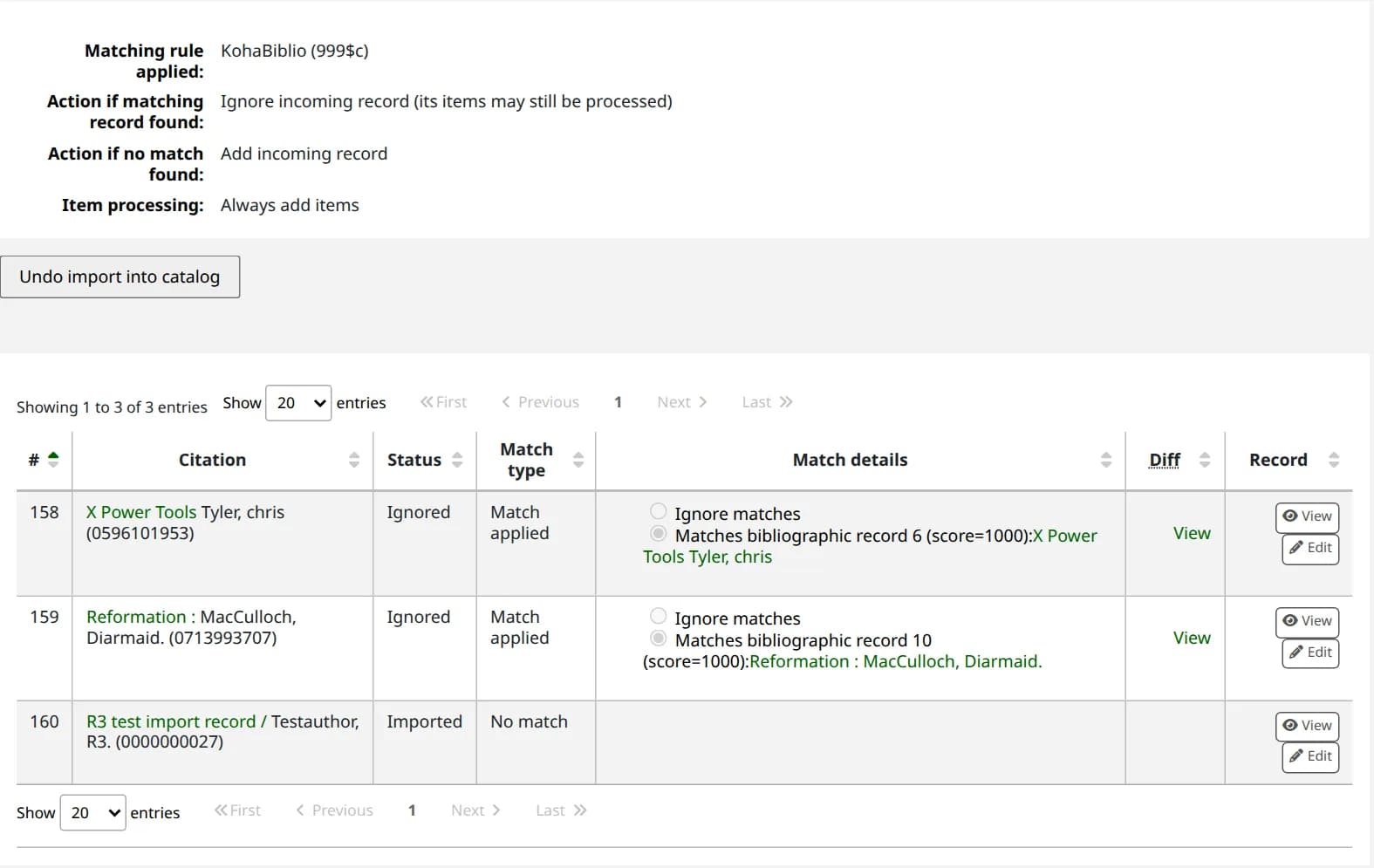
Then search for one of the imported titles. If the record opens by its number but does not come up in a search, the records are in and the index is behind — see rebuilding the Zebra index.
For a file too large for the browser
Uploading a very large file through a web form is where imports time out. The same two steps exist as command-line scripts, and they use the same staging area — so a file staged on the command line is still reviewed and committed in the staff interface if you prefer.
First find the number of the matching rule to use. --match takes that number, and a server installed with the web installer's default choices has no rules at all: Koha's own default rules are an optional data set the installer leaves unticked. The first query below printing nothing means that; the second command loads Koha's defaults (ISBN, ISSN, and KohaBiblio on 999$c):
$ sudo koha-mysql library -e "SELECT matcher_id, code FROM marc_matchers"$ sudo koha-shell -c "perl -MC4::Installer -e \"print C4::Installer->new->load_sql(shift) // qq{done\\n}\" \ /usr/share/koha/intranet/cgi-bin/installer/data/mysql/en/marcflavour/marc21/optional/marc21_default_matching_rules.yml" librarydone$ sudo koha-mysql library -e "SELECT matcher_id, code FROM marc_matchers"+------------+------------+| matcher_id | code |+------------+------------+| 1 | ISBN || 2 | ISSN || 3 | KohaBiblio |+------------+------------+Response from a live run on Koha 26.05
Run the loading command only when the first query prints nothing: run twice, it adds a second set of rules. You can also make a rule by hand in Administration → Record matching rules. Then stage the file with the rule's number:
$ sudo koha-shell -c "perl /usr/share/koha/bin/stage_file.pl \ --file /tmp/records.mrc \ --format ISO2709 \ --encoding UTF-8 \ --add-items \ --match 3 \ --comment \"Supplier load, August\"" library ... staging MARC records -- please wait... processed 2 records... finished staging MARC records... looking for matches with records already in databaseInvalid normalization routine required (Biblionumber) at …/C4/Matcher.pm line 1014.... processed 2 records... finished looking for matches MARC record staging report------------------------------------Input file: /tmp/records.mrcRecord type: biblioNumber of input records: 2Number of valid records: 2Number of invalid records: 0Number of records matched: 1Number of items parsed: 1 Batch number assigned: 7Response from a live run on Koha 26.05
That is the response from a two-record test file in which one record was already in the catalogue; your counts and batch number will differ. Replace library with your instance name and /tmp/records.mrc with your file, which the instance user must be able to read. Inside koha-shell -c "…" write quotes as \", as above: koha-shell wraps the command in single quotes, so a single quote in it cuts the text short with no error (on our server --comment 'Supplier load, August' saved the comment Supplier). The Invalid normalization routine required (Biblionumber) line is printed whenever the KohaBiblio rule is used and is harmless: the match still worked.
Do not leave out --match. Without it the script compares nothing: the report says Incoming records not matched against existing records (--match option not supplied), every record is staged as No match, and committing adds a second copy of every record the catalogue already has. Its value is the number of a rule in Administration → Record matching rules, as the query above prints them. The script does not tell you when the number is not a rule: it quietly falls back to its own rule (same ISBN and title), so records without an ISBN never match. On a fresh server that printed the normal report with Number of records matched: 0, and committing the batch would have added a second copy of the record already in the catalogue. With --match, a matched record is replaced by the incoming one unless you add --no-replace, which leaves matched records alone; --no-create skips records with no match.
--format takes ISO2709 (the default) or MARCXML, in capitals: a lowercase iso2709 gets past the option check and then stops with Can't use an undefined value as an ARRAY reference at /usr/share/koha/bin/stage_file.pl line 136. The batch number the report ends with is what you commit. --list-batches shows the batches waiting to be committed:
$ sudo koha-shell -c "perl /usr/share/koha/bin/commit_file.pl \ --list-batches" library # File name Batch comments Status----- ------------------------- ------------------------- ---------- 7 /tmp/records.mrc Supplier load, August stagedResponse from a live run on Koha 26.05
It lists only batches that are staged or reverted, the two states that can be committed. A batch disappears from it once imported; it is still on the Manage staged MARC records screen. Then commit:
$ sudo koha-shell -c "perl /usr/share/koha/bin/commit_file.pl \ --batch-number 7 --framework FA" library ... importing MARC records -- please wait... processed 2 records... finished importing MARC records MARC record import report----------------------------------------Batch number: 7Number of new records added: 1Number of records replaced: 1Number of records ignored: 0Number of items added: 1Number of items replaced: 0Number of items ignored: 0 Note: an item is ignored if its barcode is aduplicate of one already in the database.Response from a live run on Koha 26.05
--framework is the framework for new records; a replaced record keeps its own. Leave it out and new records go into the default framework. Committing a batch that is already imported is refused with import batch 7 status is 'imported', and therefore cannot be imported.
Both scripts must run with the instance's environment, which is what koha-shell provides. Run directly, they stop with unable to locate Koha configuration file koha-conf.xml, explained in this article.
Undoing an import
A committed batch can be reverted with Undo import into catalog on the same Manage staged MARC records screen. Koha removes the records it created, with their items, and puts back the earlier version of the ones it replaced. The status changes to Reverted when the background job finishes.
The command-line revert stops on batches with items
commit_file.pl --revert exists, but in Koha 26.05 it fails on any batch that added items. It runs as a placeholder user that is not a real patron, and the first item it tries to delete stops it:
$ sudo koha-shell -c "perl /usr/share/koha/bin/commit_file.pl \ --revert --batch-number 7" library ... reverting batch -- please waitCan't call method "can_edit_items_from" on an undefined value at /usr/share/koha/lib/Koha/Item.pm line 375.Response from a live run on Koha 26.05
The records it reached before the item are already put back, and the batch is left at status Reverting, where the staff screen offers no Undo button. To finish the job, set the batch back to imported and undo it in the staff interface, which runs as your staff account and does not hit the problem. Records already reverted are skipped:
$ sudo koha-mysql library -e "UPDATE import_batches SET import_status = 'imported' WHERE import_batch_id = 7 AND import_status = 'reverting'"Run live on Koha 26.05: it prints nothing when it works
It prints nothing. Reload the batch in Manage staged MARC records, click Undo import into catalog and confirm. The command-line revert still works on a batch that added no items, but the staff screen is the one to use.
It is genuinely useful and it is not a substitute for a backup. A revert can only undo what that batch did; it cannot undo what staff have done to those records since, and it cannot help with a second import that overlapped the first. If an import has been live for a day, restore from a backup instead of reverting.
Why staging exists
Almost every serious catalog accident is an import. Not because importing is difficult, but because the mistakes are invisible at the moment they are made and enormous by the time they are noticed: a matching rule that matched nothing turns 12,000 records into 24,000; a rule that matched too much overwrites hand-corrected cataloging with a supplier's minimal records.
Staging puts a readable report between the file and the catalog, and it is the only point at which either of those mistakes is cheap. Committing a batch is one click either way — the difference is entirely whether anybody read the numbers first.
The same discipline covers the things staging cannot tell you. Whether the records use the MARC flavour your catalog uses is a question to settle before the file is created — MARC21 or UNIMARC explains why that one is not reversible. And when the source is another catalog rather than a file, a Z39.50 target imports one record at a time, correctly, with no staging needed at all.
Tested on live Koha 26.05.02
Passed all 55 checks · Read the run log
- Koha release
- 26.05.02
- System
- Debian 13 (trixie)
- Setup
- Official Koha test container (koha-common commands). A command that needs systemd or a firewall says where it ran.
- Source read at
- Koha commit d3fc229
Earlier live checks (1)
- , Koha 26.05.02 (commit d3fc229): all 40 claims held. Read the run log
In the Koha manual (26.05)
Verified against the Koha source (6 files)
- misc/stage_file.pl (lines 50-62, 91-95, 120-200)
- misc/commit_file.pl (lines 26-140)
- C4/ImportBatch.pm (lines 880-960)
- Koha/Item.pm (lines 363-375)
- tools/manage-marc-import.pl (lines 125-143, 300-320)
- koha-tmpl/intranet-tmpl/prog/en/modules/tools/manage-marc-import.tt (lines 165-180, 319-326)
The label under each command says where its response came from; a command with no label was not run live. How we test and which standards we follow.
Records still not behaving? We clean, convert and load catalogue data for libraries every week.
Want your staff trained on this? We teach it hands on with a live Koha, online or at your library. Ask about staff training
Related
More on cataloging & marc
Answers to the questions that usually arrive with this one.
Broken characters (�, é) in Koha after a MARC import
Diamonds with question marks, or é shown as é, mean the file was staged under the wrong character encoding. The characters cannot be repaired in Koha; undo the batch and import again with the right encoding.
"Something went wrong when loading the table" on a Koha record
The record opens, the holdings table does not. It is one bad row rather than a broken Koha — usually items with no home or holding library, which an import can create in seconds.
MARC21 or UNIMARC: the choice you cannot undo
Koha asks for a MARC flavour before you catalogue anything, and changing it later means re-importing the catalogue. Unless you have a specific reason, choose MARC21.