

Reports & statistics
Koha SQL reports you can copy (and how to make your own)
Seven ready-to-paste Koha SQL reports, each run on Koha 26.05: overdue items, stock by location, checkouts per month, items never borrowed, expiring memberships, unpaid fines and items of one type. Plus how to save one with a library or date to choose at run time.
By Babar Junaid
Published 2026-11-13 · Tested against Koha 26.05
To add an SQL report in Koha, go to Reports → Create from SQL, give it a Report name, paste a SELECT query, and click Save report, then Run report. Put <<Library|branches>> or <<From|date>> in the query to have Koha ask for a library or a date each time it runs. The seven reports below are ready to paste.
| Step | Screen |
|---|---|
| Write the report | Reports → Create from SQL/cgi-bin/koha/reports/guided_reports.pl?op=add_form_sql |
| Run or edit it later | Reports → Saved reports/cgi-bin/koha/reports/guided_reports.pl?op=list |
| Look up a column | Reports → Koha database schema (schema.koha-community.org) |
Step 1: Save a report
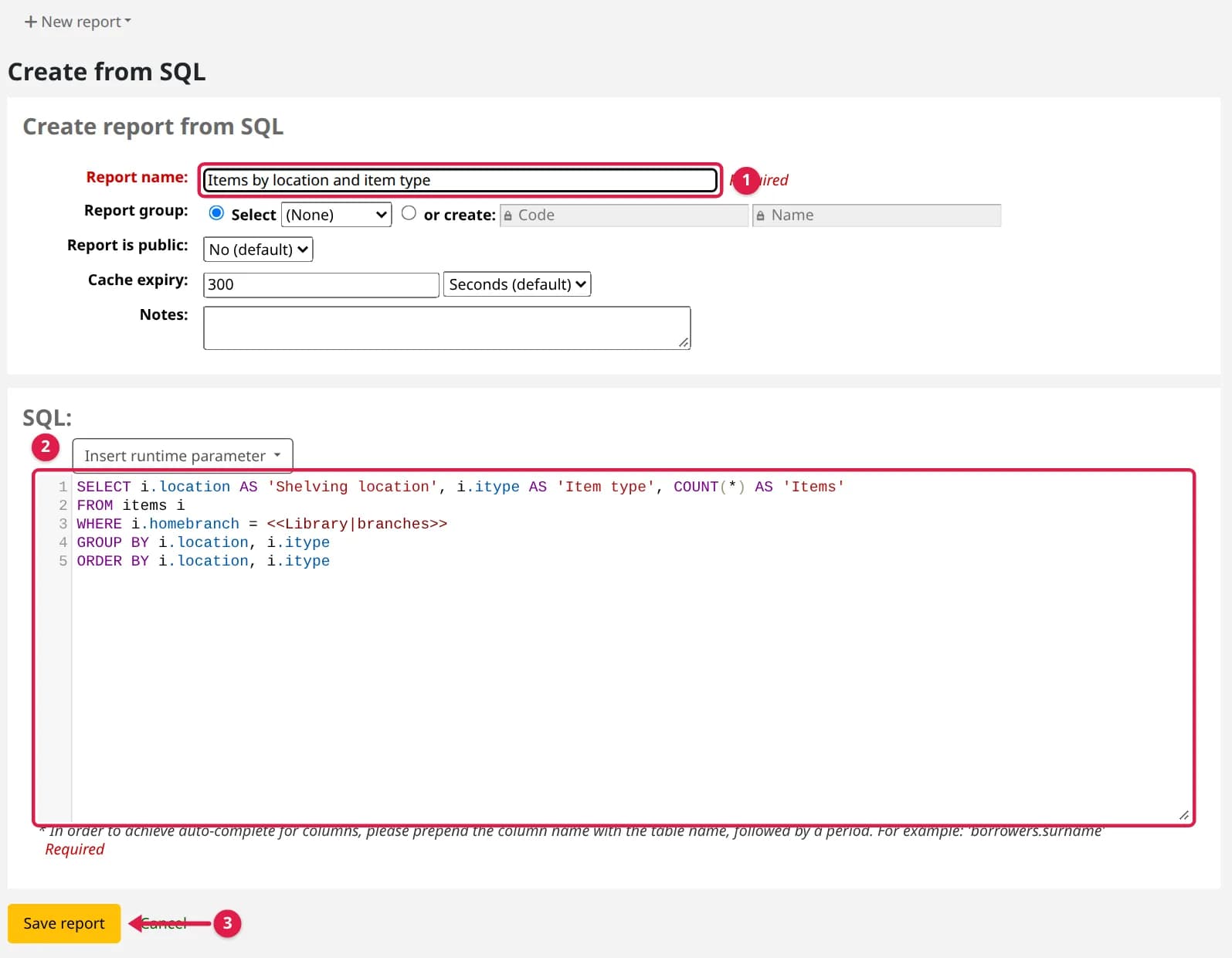
- 1Go to Reports and click Create from SQL.
- 2Enter the Report name staff will see in the list, and optionally a group, so reports for one module stay together.
- 3Paste the query into SQL. To add a choice at run time, click Insert runtime parameter and pick one (Libraries, Item types, Patron categories, Date, Authorized values…).
- 4Click Save report. Koha answers Your report "…" has been saved; click Run report.
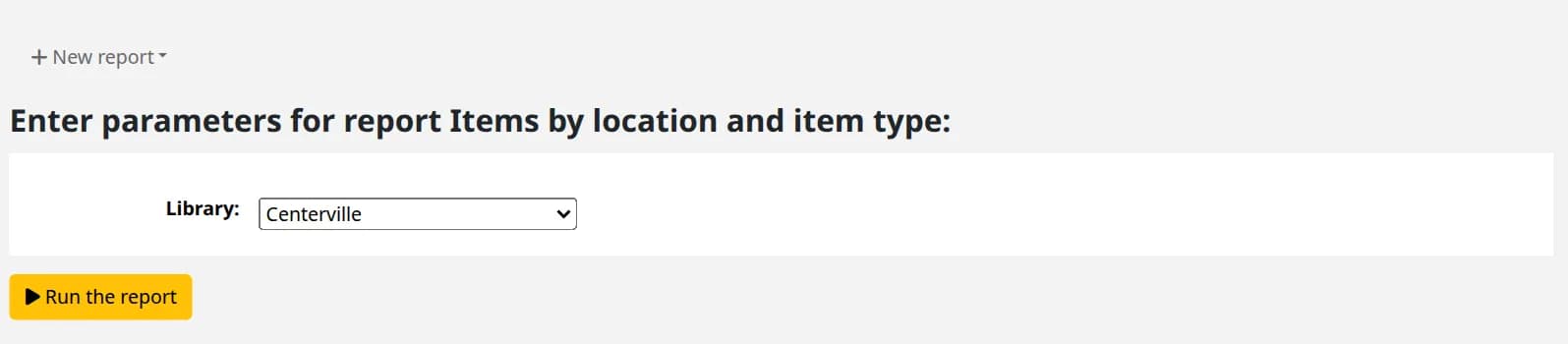
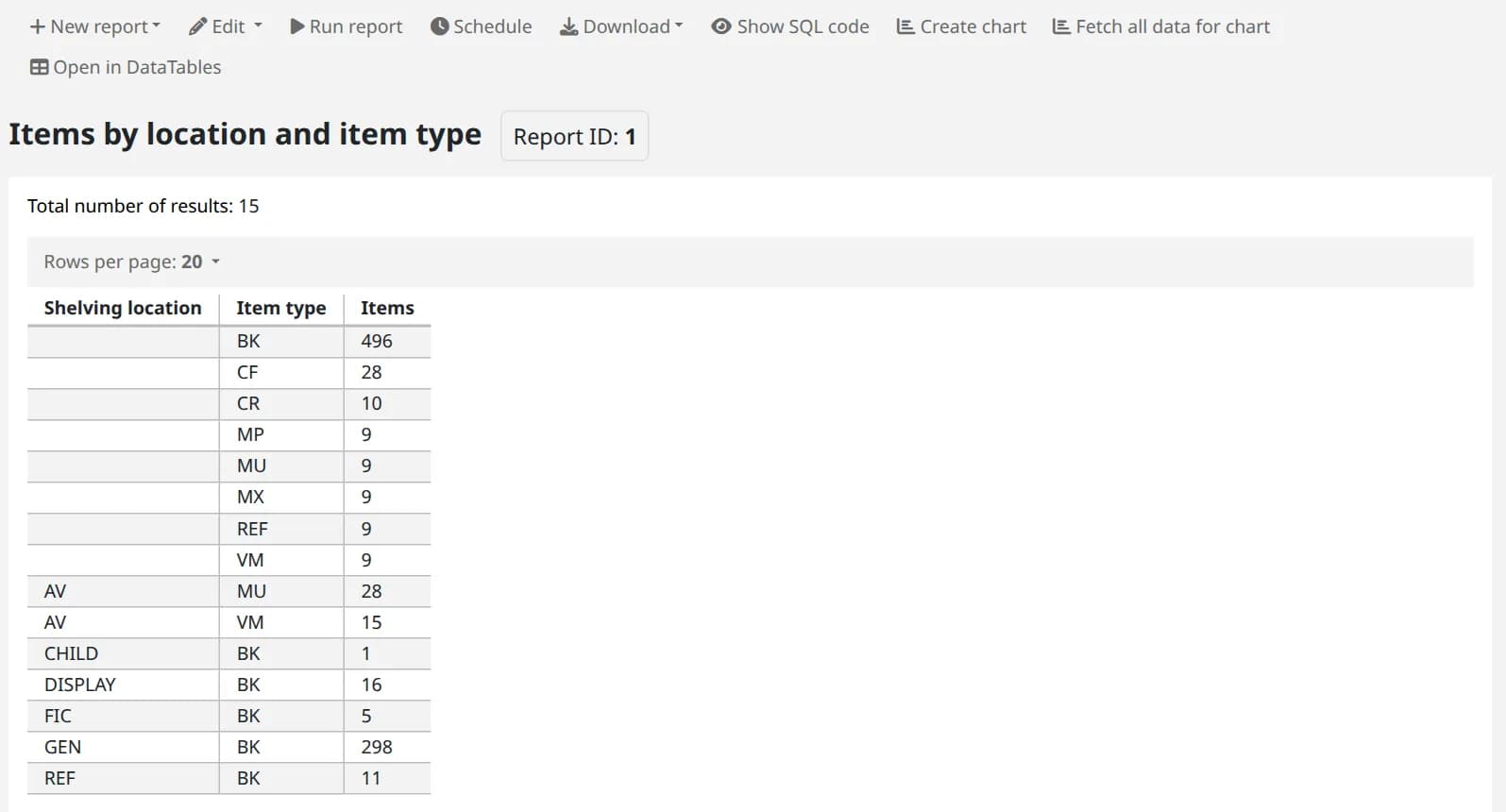
- 5If it asks for parameters, choose them and click Run the report. Download gives the result as a spreadsheet.
Step 2: Seven reports to copy
Each was run on Koha 26.05 against the standard database. Labels in AS '…' become column headings; change them to your own language freely.
1. Overdue items at a library, oldest first
SELECT b.cardnumber, b.surname, b.firstname, i.barcode, bib.title, iss.date_due, DATEDIFF(CURDATE(), iss.date_due) AS 'Days overdue'FROM issues issJOIN borrowers b USING (borrowernumber)JOIN items i USING (itemnumber)JOIN biblio bib ON bib.biblionumber = i.biblionumberWHERE iss.date_due < NOW() AND iss.branchcode = <<Library|branches>>ORDER BY iss.date_dueiss.branchcode is the library the book was checked out at; use i.homebranch instead for books that belong to the library.
2. Stock count by shelving location and item type
SELECT i.location AS 'Shelving location', i.itype AS 'Item type', COUNT(*) AS 'Items'FROM items iWHERE i.homebranch = <<Library|branches>>GROUP BY i.location, i.itypeORDER BY i.location, i.itype3. Checkouts per month between two dates
SELECT DATE_FORMAT(datetime, '%Y-%m') AS 'Month', COUNT(*) AS 'Checkouts'FROM statisticsWHERE type = 'issue' AND DATE(datetime) BETWEEN <<From|date>> AND <<To|date>>GROUP BY DATE_FORMAT(datetime, '%Y-%m')ORDER BY 1Change 'issue' to 'renew' or 'return' for renewals or returns. The statistics table keeps every transaction, so this works for past years too.
4. Items never checked out
SELECT i.barcode, i.itemcallnumber, bib.title, i.dateaccessionedFROM items iJOIN biblio bib USING (biblionumber)WHERE (i.issues IS NULL OR i.issues = 0) AND i.homebranch = <<Library|branches>>ORDER BY i.dateaccessionedUseful for weeding, and a replacement for the built-in "Items with no checkouts" report on servers where it fails under SQL strict mode (Koha bug 32117). Keep the brackets around the OR.
5. Memberships expiring in the next 30 days
SELECT cardnumber, surname, firstname, categorycode, dateexpiry, emailFROM borrowersWHERE dateexpiry BETWEEN CURDATE() AND CURDATE() + INTERVAL 30 DAYORDER BY dateexpiry6. Patrons who owe money, largest first
SELECT b.cardnumber, b.surname, b.firstname, SUM(a.amountoutstanding) AS 'Owed'FROM accountlines aJOIN borrowers b USING (borrowernumber)WHERE a.amountoutstanding > 0GROUP BY a.borrowernumber, b.cardnumber, b.surname, b.firstnameORDER BY 4 DESC7. Every item of one item type
SELECT i.itemnumber, i.barcode, i.itemcallnumber, bib.titleFROM items iJOIN biblio bib USING (biblionumber)WHERE i.itype = <<Item type|itemtypes>>ORDER BY i.itemcallnumberDownload the barcodes and feed them to batch item modification to move the items to another type, for example before deleting an item type.
More reports, free on GitHub
Our free koha-sql-reports collection has 18 more for circulation, the collection, patrons, holds and money, each with a page that explains what it answers, what it asks for and its columns. Every report there is run through Koha's own report code on a real Koha before each release, and the test log is attached to the release.
What Koha can say
| Koha shows | What it means |
|---|---|
| This report contains an SQL keyword: DELETE. … Only SELECT queries are allowed. | Reports can only read. Changing data is done with the batch tools, never a report |
| SQL error: Unknown column 'titel' in 'SELECT' | A misspelt column or a column in another table. Check the name in the database schema |
| The column selection in this report includes a password field. | Remove password (and SELECT * on borrowers) from the query |
| Please select a cache expiry less than 30 days. | Lower the report's cache expiry |
| This report is already running. | Wait for the first run to finish; a slow report should be narrowed by date or library |
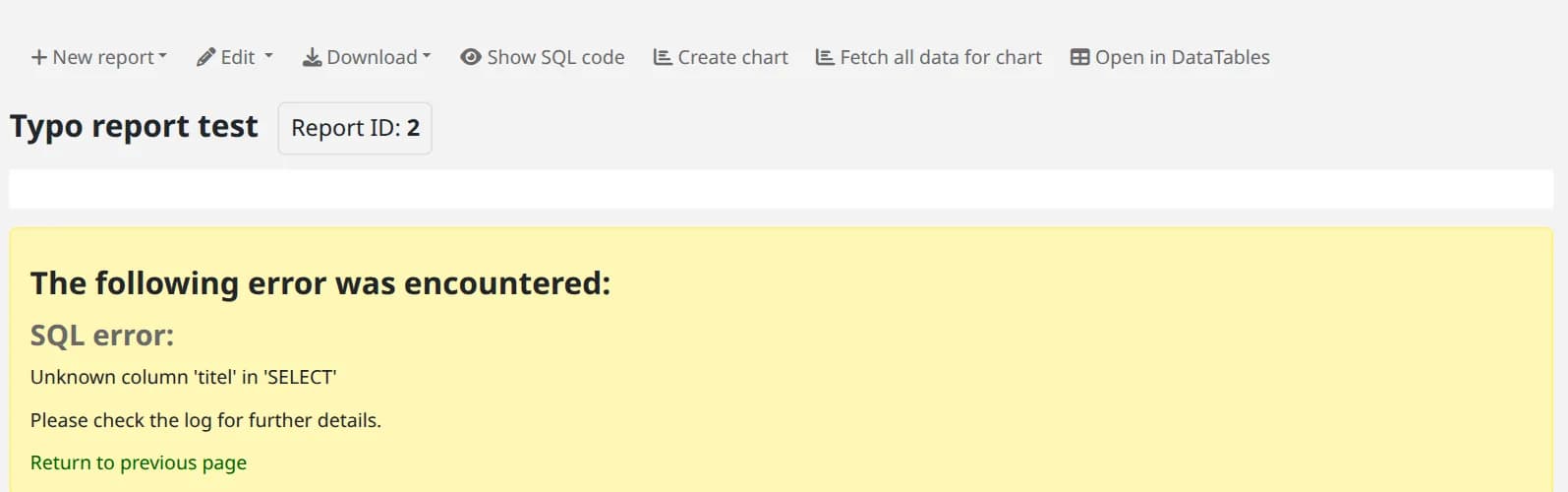
Saving does not test the query
Results are shown a page at a time (Rows per page), and Download exports all of them. For the meaning of a column, Reports → Koha database schema opens schema.koha-community.org.
Tested on live Koha 26.05.02
Passed all 15 checks · Read the run log
- Koha release
- 26.05.02
- System
- Debian 13 (trixie)
- Setup
- Official Koha test container (koha-common commands). A command that needs systemd or a firewall says where it ran.
- Source read at
- Koha commit d3fc229
In the Koha manual (26.05)
Verified against the Koha source (3 files)
- koha-tmpl/intranet-tmpl/prog/en/modules/reports/guided_reports_start.tt (lines 1444-1672)
- reports/guided_reports.pl (lines 895-1000)
- C4/Reports/Guided.pm (lines 502-595)
The label under each command says where its response came from; a command with no label was not run live. How we test and which standards we follow.
Need reports your Koha does not have, for management, an annual return or an accreditation visit? We write and test SQL reports on your own Koha.
Want your staff trained on this? We teach it hands on with a live Koha, online or at your library. Ask about staff training